Consider a typical enterprise data flow: raw transaction data lands in an Oracle database, a SAS program reads it and applies business rules, the output is written to a staging table, a Python script reads the staging table and joins it with customer demographics, the result is loaded into Snowflake by an Informatica job, a dbt model transforms it into an analytics-ready table, and a Power BI dashboard visualizes the final metrics. Six platforms, four languages, three teams — and a single question that nobody can answer with confidence: if the transaction_amount column in Oracle changes, what breaks?
This is the cross-platform lineage problem, and it is the defining data governance challenge of the modern enterprise. MigryX Atlas solves it by constructing a unified lineage graph that spans every platform, connecting SAS to Python to SQL to ETL tools to BI dashboards with column-level precision.
A Real-World Cross-Platform Data Flow
To understand how Atlas works in practice, let us trace a concrete example through four platforms. This scenario is based on patterns we see repeatedly across financial services, insurance, and healthcare organizations.
Stage 1: SAS Data Preparation
A SAS program reads raw policy data from an Oracle database via a libname connection. The DATA step applies business rules: calculating premium adjustments, flagging policies for review based on risk scores, and merging with reference tables for state-specific regulatory requirements. The output is a SAS dataset written to a shared network drive.
libname oracle oracle path="PROD" schema="POLICY";
libname staging "/data/staging";

data staging.policy_adjusted;
  merge oracle.policy_master (in=a)
        oracle.state_rules  (in=b);
  by state_code;
  if a;
  adjusted_premium = base_premium * risk_factor * state_multiplier;
  review_flag = (risk_score > 750);
run;
Atlas parses this SAS program and captures every column-level mapping: adjusted_premium derives from base_premium, risk_factor, and state_multiplier. The review_flag derives from risk_score with the threshold condition documented.
Stage 2: Python Enrichment
A Python script reads the SAS output (via a database staging table populated by a scheduled job) and enriches it with customer demographic data from a separate API. The script uses pandas to join, clean, and reshape the data before writing to a Snowflake staging schema.
import pandas as pd
import snowflake.connector

policy_df = pd.read_sql("SELECT * FROM staging.policy_adjusted", conn)
demo_df = pd.read_sql("SELECT * FROM crm.customer_demographics", conn)

enriched = policy_df.merge(demo_df, on="customer_id", how="left")
enriched["lifetime_value"] = enriched["adjusted_premium"] * enriched["tenure_years"]
enriched["risk_segment"] = pd.cut(enriched["risk_score"], bins=[0,300,600,900], labels=["low","medium","high"])

enriched.to_sql("policy_enriched", snowflake_conn, schema="analytics_staging")
Atlas traces the Python script and connects it to the SAS lineage. The lifetime_value column is now traced all the way back to its ultimate sources: base_premium, risk_factor, state_multiplier (via adjusted_premium) and tenure_years from the CRM system.
Stage 3: Snowflake Transformation
A SQL transformation in Snowflake aggregates the enriched data into summary tables for reporting. Window functions calculate rolling averages, and CTEs organize the logic into readable layers.
CREATE TABLE analytics.policy_summary AS
WITH base AS (
    SELECT state_code, risk_segment, adjusted_premium, lifetime_value,
           review_flag, policy_date
    FROM analytics_staging.policy_enriched
    WHERE policy_date >= DATEADD(year, -3, CURRENT_DATE)
),
aggregated AS (
    SELECT state_code, risk_segment,
           SUM(adjusted_premium) AS total_premium,
           AVG(lifetime_value)   AS avg_ltv,
           COUNT(CASE WHEN review_flag THEN 1 END) AS review_count,
           COUNT(*) AS policy_count
    FROM base
    GROUP BY state_code, risk_segment
)
SELECT *, ROUND(review_count * 100.0 / policy_count, 2) AS review_pct
FROM aggregated;
Atlas connects this SQL to the upstream Python lineage. The total_premium column in analytics.policy_summary is now traced through Snowflake SQL, Python pandas, and SAS DATA steps all the way back to the original Oracle source columns.
Stage 4: Power BI Visualization
A Power BI dashboard connects to the Snowflake summary table and displays KPIs: total premium by state, average lifetime value by risk segment, and review rates. Atlas captures the BI layer connection, completing the end-to-end lineage from Oracle source to executive dashboard.

MigryX Atlas — Automated column-level data lineage across your entire data estate
How Atlas Stitches Cross-Platform Lineage
The technical challenge of cross-platform lineage is connecting the boundaries — the points where one platform's output becomes another platform's input. Atlas uses several strategies to resolve these connections.
Table name resolution. When a SAS program writes to staging.policy_adjusted and a Python script reads from staging.policy_adjusted, Atlas matches these by fully-qualified table name. This handles the most common case where platforms share a database.
File path matching. When data moves via files (CSV, Parquet, SAS datasets on shared drives), Atlas matches the file paths written by one process and read by another.
ETL job configuration. ETL tools like Informatica and DataStage explicitly define source and target connections in their job metadata. Atlas parses these definitions to connect ETL-mediated data flows.
Schema inference. When column names and types match across a platform boundary but the table names differ (e.g., a file is loaded into a differently-named table), Atlas uses schema similarity scoring to suggest likely connections for human confirmation.
MigryX Atlas: Lineage That Goes Deeper
While most lineage tools stop at table-level tracking, MigryX Atlas traces every column through every transformation — joins, filters, aggregations, CASE statements, and derived calculations. It automatically generates Source-to-Target Mapping documents (STTMs) that auditors and business analysts can review without reading code. This is not just metadata scanning — it is deep semantic analysis powered by MigryX’s precision AST parsers.
Impact Analysis Across Platforms
The most immediate practical benefit of cross-platform lineage is impact analysis. When a change is proposed to any part of the data flow, Atlas can instantly identify every downstream dependency — across all platforms.
| Change Scenario | Without Atlas | With Atlas |
|---|---|---|
| Source column renamed in Oracle | Days of manual code review across SAS, Python, SQL | Instant list of every affected program, script, table, and report |
| SAS program logic modified | Unclear which Snowflake tables and dashboards are affected | Full downstream trace to every consuming table and BI report |
| Snowflake table dropped | BI dashboards break without warning | Pre-drop analysis shows all dependent reports and their owners |
| ETL job schedule changed | Downstream timing dependencies unknown | Complete list of jobs and processes that depend on the ETL output |
This is not theoretical. Organizations without cross-platform lineage experience production incidents when upstream changes cascade through untracked dependencies. These incidents are expensive — not just in engineering time to diagnose and fix, but in lost trust from business stakeholders who received incorrect data.
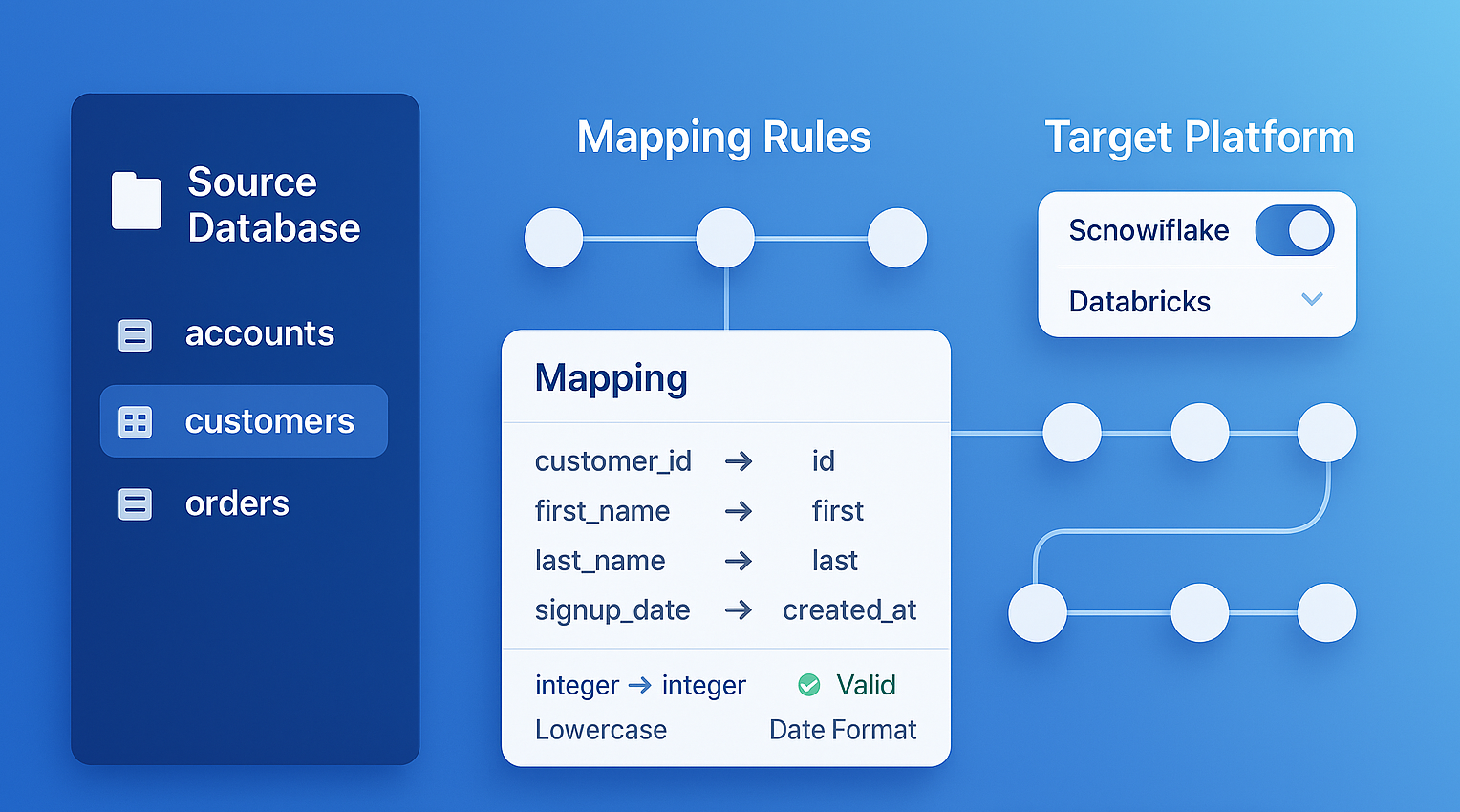
MigryX generates comprehensive Source-to-Target Mappings (STTMs) automatically, eliminating weeks of manual documentation
Why Manual Lineage Documentation Fails — And How MigryX Fixes It
Enterprise data estates contain thousands of interdependent programs. Manual lineage documentation is outdated the moment it is written. MigryX Atlas continuously analyzes your codebase and produces lineage maps that reflect the actual state of your data pipelines — not what someone documented six months ago. Teams using MigryX Atlas report reducing impact analysis time from weeks to hours.
Automated Data Lineage vs. Manual Documentation
Some organizations attempt to solve cross-platform lineage through manual documentation. Data architects create Visio diagrams showing table-level flows. Analysts maintain spreadsheets mapping source columns to targets. Governance teams build wikis documenting ETL dependencies. The effort is well-intentioned but fundamentally unscalable.
Automated data lineage through code parsing, as Atlas provides, differs from manual documentation in three critical ways:
- Completeness. Automated parsing captures every column mapping, every conditional branch, every filter condition. Manual documentation inevitably omits details that seem unimportant at the time but prove critical later.
- Currency. Automated lineage is regenerated from current code on demand. Manual documentation reflects the state of the system when the document was last updated — which may have been months or years ago.
- Cross-platform continuity. Automated lineage stitches connections across platform boundaries because it analyzes all platforms simultaneously. Manual documentation is typically siloed by team, with cross-platform connections either missing or maintained separately.
The true cost of manual lineage documentation is not the initial creation — it is the compounding inaccuracy over time, and the false confidence it creates in decisions made based on outdated information.
ETL Lineage Mapping: Connecting the Middleware
ETL tools occupy a unique position in the data ecosystem. They are purpose-built for moving data between systems, yet their internal lineage is often the hardest to extract. Informatica mappings are stored in a proprietary repository. DataStage jobs are defined in binary DSX files. SSIS packages are XML-based but deeply nested. Talend jobs are Java-generated code with metadata in XML.
Atlas includes dedicated parsers for each major ETL platform. It extracts source-to-target mappings from ETL job definitions with the same column-level granularity it applies to code-based transformations. Critically, Atlas connects ETL-mediated flows to the broader lineage graph — linking the ETL source to upstream SAS or Python outputs, and the ETL target to downstream SQL transformations and BI reports.
This eliminates the common lineage gap where data "disappears" into an ETL tool and "reappears" in a target system with no documented connection between the two.
Key Takeaways
- Cross-platform lineage is the most critical and most neglected aspect of data governance. Data flows through multiple languages and tools, but lineage typically stops at platform boundaries.
- Atlas connects lineage across SAS, Python, PySpark, SQL, ETL tools, and BI platforms into a single unified graph with column-level precision.
- Impact analysis across platforms becomes instant rather than requiring days of manual investigation.
- Automated data lineage through code parsing provides completeness, currency, and cross-platform continuity that manual documentation cannot match.
- ETL lineage mapping closes the common gap where data flows "disappear" inside middleware tools.
The modern data stack is inherently multi-platform. Data flows through SAS, Python, SQL, ETL tools, cloud warehouses, and BI platforms — and lineage that does not span all of these platforms is lineage that misses the most important connections. MigryX Atlas provides the automated, cross-platform, column-level data lineage that modern governance demands.
Why MigryX Is Essential for Data Lineage
The challenges described throughout this article are exactly what MigryX was built to solve. Here is how MigryX transforms this process:
- Column-level precision: MigryX traces data from source field to target column through every transformation step, not just table-to-table connections.
- Automated STTM generation: Source-to-Target Mapping documents are produced automatically, saving weeks of manual effort per migration wave.
- Cross-platform support: MigryX Atlas handles lineage across SAS, Informatica, DataStage, Alteryx, SSIS, and 20+ other technologies in a single unified view.
- Regulatory compliance: SOC 2 compliant audit trails ensure every data flow is documented for regulatory review.
MigryX combines precision AST parsing with Merlin AI to deliver 99% accurate, production-ready migration — turning what used to be a multi-year manual effort into a streamlined, validated process. See it in action.
Trace Your Data Across Every Platform
See how Atlas connects lineage from legacy SAS programs to modern cloud analytics — end to end.
Explore Atlas Schedule a Demo