Every platform migration begins with confidence and ends with surprises. The SAS-to-Python migration that was scoped for six months stretches to eighteen. The Informatica-to-cloud-native project that "only" involved 200 jobs turns out to touch 1,400 downstream reports. The Teradata-to-Snowflake move that seemed straightforward breaks three regulatory reports that nobody knew depended on a specific stored procedure. These surprises are not bad luck — they are the predictable consequence of migrating without comprehensive impact analysis.
MigryX Atlas transforms migration impact analysis from a manual, error-prone exercise into an automated, exhaustive discovery process. By analyzing every line of code across every platform before the migration begins, Atlas reveals every dependency, every hidden connection, and every downstream consumer — so you know exactly what will break before you move a single table.
Why Migrations Fail Without Impact Analysis
The fundamental problem is visibility. Legacy platforms accumulate dependencies over years or decades. A SAS environment that started with 50 programs in 2005 may now contain 3,000 programs, 800 macros, and connections to 15 databases. The original architects have left. Documentation, if it ever existed, is years out of date. The current team knows their own programs but has no visibility into what other teams built on top of the same data.
Without comprehensive impact analysis, migration teams make three critical errors:
- Underestimating scope. They count programs but miss the dependencies between programs. Migrating 500 SAS programs sounds manageable until you discover that those programs share 200 macros, reference 50 format catalogs, and feed 300 downstream SQL processes.
- Missing cross-platform dependencies. The SAS migration team focuses on SAS code but does not know that Python scripts, Informatica jobs, and stored procedures also depend on SAS-produced datasets. Decommissioning SAS breaks these invisible consumers.
- Ignoring conditional and rare execution paths. Legacy code contains conditional logic that only executes monthly, quarterly, or annually. Manual code review during migration planning often focuses on the main execution path, missing the quarterly regulatory report that depends on a rarely-used SAS program.
The costliest migration failures are not the known challenges — they are the unknown dependencies that surface in production weeks or months after the migration is declared "complete."

MigryX Atlas — Automated column-level data lineage across your entire data estate
Pre-Migration Discovery with Atlas
Atlas begins every migration engagement with a comprehensive discovery phase. This is not a high-level inventory count — it is a deep, code-level analysis of the entire legacy estate and everything connected to it.
Code Inventory and Classification
Atlas ingests every program, script, query, and job definition in the migration scope. It classifies each artifact by language, complexity, and function. A SAS program that contains only a PROC PRINT is classified differently from one that contains 500 lines of DATA step logic with nested macros and multiple output datasets. This classification enables realistic effort estimation — not just a program count, but a complexity-weighted assessment.
Dependency Graph Construction
From the parsed code, Atlas builds a complete dependency graph. This graph captures:
- Data dependencies: which programs read from which tables, files, and datasets, and which programs write to them.
- Code dependencies: which programs call which macros, functions, stored procedures, and shared libraries.
- Temporal dependencies: which programs must run before others based on data availability (inferred from read/write patterns).
- Cross-platform dependencies: where data crosses platform boundaries — SAS output consumed by Python, ETL output consumed by SQL, database tables consumed by BI tools.
The dependency graph is the foundation of all subsequent migration analysis. Without it, every migration decision is based on incomplete information.
Dead Code Identification
A significant portion of any legacy codebase is dead code — programs that are no longer executed, tables that are no longer read, macros that are no longer called. Atlas identifies dead code by analyzing the dependency graph for orphaned nodes: programs with no callers, tables with no readers, datasets that are written but never consumed. In typical legacy SAS environments, 15-30% of the codebase is dead code. Identifying and excluding it from the migration scope immediately reduces cost and complexity.
MigryX Atlas: Lineage That Goes Deeper
While most lineage tools stop at table-level tracking, MigryX Atlas traces every column through every transformation — joins, filters, aggregations, CASE statements, and derived calculations. It automatically generates Source-to-Target Mapping documents (STTMs) that auditors and business analysts can review without reading code. This is not just metadata scanning — it is deep semantic analysis powered by MigryX’s precision AST parsers.
Dependency Mapping and Risk Scoring
Not all dependencies carry equal risk. Atlas assigns a risk score to each dependency based on several factors.
| Risk Factor | Low Risk | Medium Risk | High Risk |
|---|---|---|---|
| Dependency type | Single table read | Multi-table join with business logic | Cross-platform dependency with transformation |
| Consumer count | 1-2 downstream consumers | 3-10 consumers | 10+ consumers or regulatory reports |
| Code complexity | Simple SELECT or DATA step | Moderate logic with conditions | Complex macro-driven, multi-step transformation |
| Change frequency | Stable (no changes in 12+ months) | Periodic updates (quarterly) | Frequently modified (monthly or more) |
| Test coverage | Automated tests exist | Manual test procedures documented | No documented testing |
The risk score enables migration teams to prioritize their effort. High-risk dependencies receive more thorough testing, earlier migration, and dedicated validation resources. Low-risk dependencies can be migrated in bulk with automated testing. This risk-based approach prevents the common failure mode of applying uniform effort to every component regardless of its actual impact.
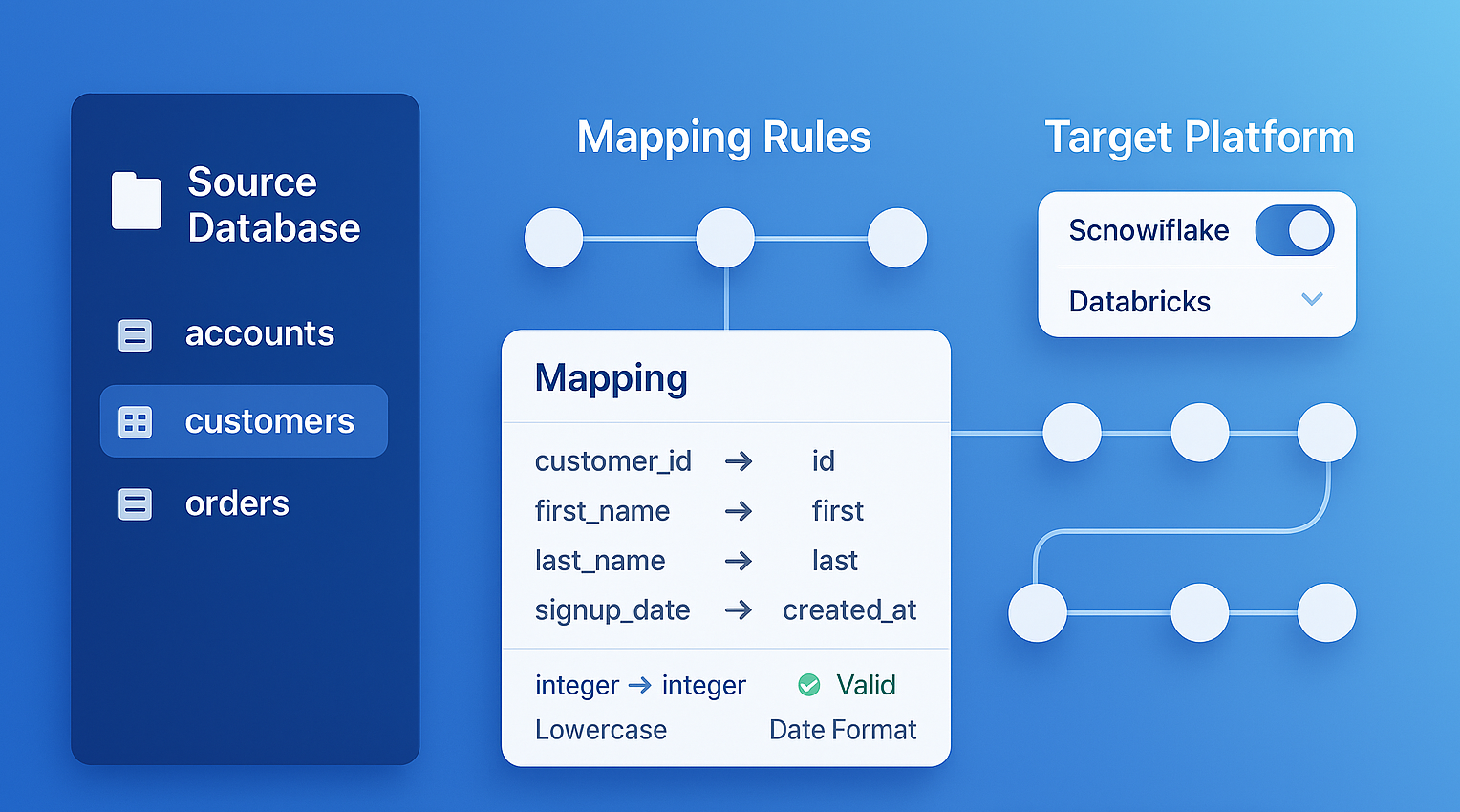
MigryX generates comprehensive Source-to-Target Mappings (STTMs) automatically, eliminating weeks of manual documentation
Why Manual Lineage Documentation Fails — And How MigryX Fixes It
Enterprise data estates contain thousands of interdependent programs. Manual lineage documentation is outdated the moment it is written. MigryX Atlas continuously analyzes your codebase and produces lineage maps that reflect the actual state of your data pipelines — not what someone documented six months ago. Teams using MigryX Atlas report reducing impact analysis time from weeks to hours.
Finding Hidden Dependencies
The most dangerous dependencies are the ones nobody knows about. Atlas excels at finding these hidden connections because it analyzes code rather than relying on human knowledge.
Dynamic table references. SAS macros frequently construct table names dynamically: data &lib..&prefix._&date.; resolves to different tables depending on macro variable values. Manual code review may not trace all possible resolutions. Atlas resolves macro variables using configuration files, autoexec programs, and historical execution patterns to identify the full set of tables that a dynamic reference can produce.
Indirect dependencies through shared infrastructure. Two programs that never reference each other may still be dependent if they both write to the same table, with one overwriting the other's output. Atlas detects these write-write conflicts and flags them as hidden dependencies.
Format and catalog dependencies. SAS programs depend on user-defined formats stored in format catalogs. If a format catalog is not migrated, every program that uses those formats will fail. Atlas inventories format usage across the entire codebase and maps each program to the formats it requires.
Environment-specific configuration. Programs that read configuration from environment variables, config files, or registry entries have dependencies that are invisible in the code itself. Atlas flags these external references so migration teams can ensure the target environment is configured correctly.
Migration Wave Planning
With the dependency graph and risk scores in hand, Atlas enables intelligent migration wave planning. Instead of migrating programs in arbitrary batches, Atlas computes migration waves based on dependency order.
Wave 1 contains programs with no upstream dependencies on other in-scope programs — they read only from stable source systems that will persist through the migration. These can be migrated first without breaking anything.
Wave 2 contains programs that depend only on Wave 1 outputs. Once Wave 1 is migrated and validated, Wave 2 programs can safely follow.
Subsequent waves continue this pattern, each building on the validated outputs of previous waves. Cross-platform dependencies are flagged as wave boundaries — points where migration must pause and validate before proceeding.
This wave-based approach transforms a chaotic, all-at-once migration into a structured, incremental process where each wave can be validated independently. If a problem is discovered in Wave 3, it does not invalidate the work done in Waves 1 and 2.
Continuous Impact Analysis During Migration
Impact analysis is not a one-time activity. During a multi-month migration, the legacy environment continues to evolve. New programs are written, existing programs are modified, and new dependencies are created. Atlas provides continuous impact analysis by re-scanning the codebase periodically and updating the dependency graph.
This continuous scanning catches a critical failure mode: drift between the migration plan and the actual codebase. If a developer adds a new SAS program that depends on a table scheduled for decommission in Wave 4, Atlas detects this new dependency immediately — before it becomes a production incident.
Atlas also tracks migration progress against the dependency graph, showing which programs have been migrated, which are in progress, and which are blocked by unmigrated dependencies. This provides migration leadership with an accurate, real-time view of progress that goes beyond simple program counts to reflect actual dependency resolution.
Key Takeaways
- Migration failures are caused by unknown dependencies, not known challenges. Impact analysis is the single most important pre-migration activity.
- Atlas builds a complete dependency graph from code analysis, capturing data, code, temporal, and cross-platform dependencies.
- Dead code identification typically removes 15-30% of the migration scope, directly reducing cost and timeline.
- Risk scoring enables teams to focus effort where it matters most — high-risk, high-impact dependencies.
- Wave-based migration planning, derived from the dependency graph, transforms chaotic migrations into structured, incremental processes.
- Continuous impact analysis during migration catches new dependencies created after planning is complete.
Platform migrations are expensive, disruptive, and risky. But the risk is not inherent in the migration itself — it is in the unknown dependencies that manual analysis cannot reliably find. MigryX Atlas eliminates this uncertainty by providing exhaustive, code-derived impact analysis before the first line of code is migrated. When you know what will break before you move, the migration becomes a managed process rather than a gamble.
Why MigryX Is Essential for Data Lineage
The challenges described throughout this article are exactly what MigryX was built to solve. Here is how MigryX transforms this process:
- Column-level precision: MigryX traces data from source field to target column through every transformation step, not just table-to-table connections.
- Automated STTM generation: Source-to-Target Mapping documents are produced automatically, saving weeks of manual effort per migration wave.
- Cross-platform support: MigryX Atlas handles lineage across SAS, Informatica, DataStage, Alteryx, SSIS, and 20+ other technologies in a single unified view.
- Regulatory compliance: SOC 2 compliant audit trails ensure every data flow is documented for regulatory review.
MigryX combines precision AST parsing with Merlin AI to deliver 99% accurate, production-ready migration — turning what used to be a multi-year manual effort into a streamlined, validated process. See it in action.
Know Your Migration Risk Before You Start
See how Atlas maps every dependency in your legacy estate and builds a risk-scored migration plan.
Explore Atlas Schedule a Demo